mercoledì, ottobre 19, 2005

ps2 optical mouse

It is sooo strange but this Logitech optical doesnt work on OpenSuse 10.0 and you have to act a trick. I hate this cause people get far from linux when they get problems like this =( and I HATE this... wanna see linux on every machine I sell and I hope this for the future.
Anyway this is the trick:

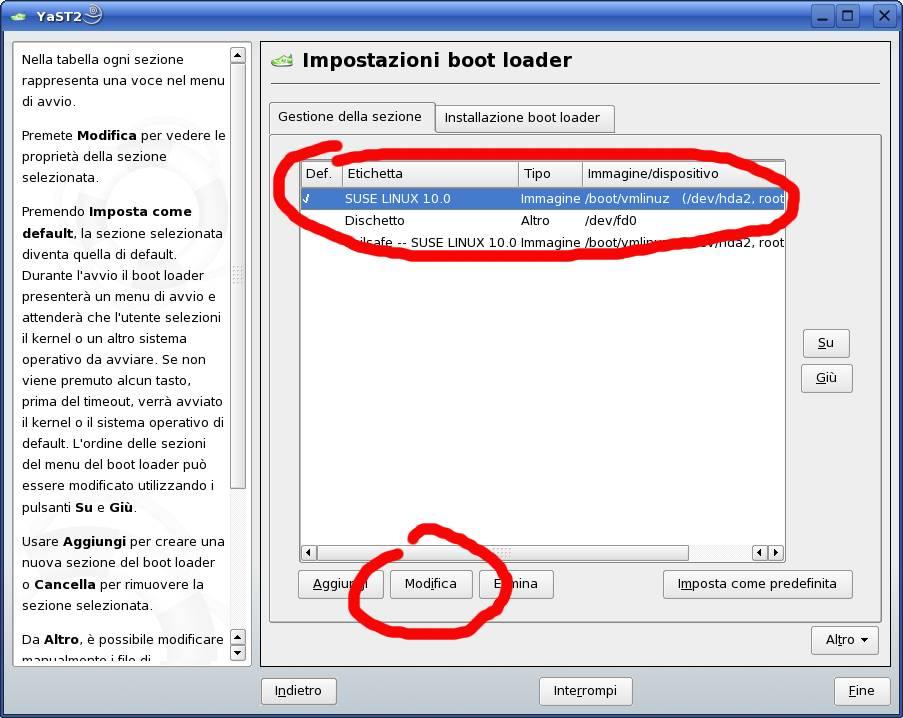
open Yast -> System -> bootloader configuration
modify the boot option and add psmouse.proto=imps to Other Kernel Parameters
reboot

and that's it!

enjoy your suse
Antonio
martedì, ottobre 18, 2005

ipv6 problems AGAIN

AGAIN since 9.1 version, ipv6 still break your internet connection, delaying DNS answere and giving the TIMEOUT ERROR!

To disable this annoying thing, just edit /etc/modules.conf, go to the line containing "net-pf-10 ipv6" and change to "net-pf-10 off".
Restart your machine and the world will smile again!

happy suse!
antonio

lunedì, ottobre 17, 2005

use common YaST sources on every PC

If you want to transfer all YaST source installation settings to another machine without adding every source manually copy this folder from the configured machine to the other one :)

/var/adm/YaST/InstSrcManager

enjoy your suse!
antonio

martedì, ottobre 11, 2005

openSUSE 10.0 is out


After a long wait, the first community release of openSUSE is OUT and I'm really happy to update my systems.

Here I'll give you some reference links even if you dont really need it cause it's easy to find it on google :)

Download: http://www.opensuse.org/Mirrors_Released_Version

After the installation add more Yast sources to have a Complete operating system with all plugins you need for your browser, Java and more: http://www.opensuse.org/index.php/Package_Repositories

Other third parties YaST repositories: http://www.opensuse.org/YaST_package_repository

Happy openSUSE!

sabato, settembre 17, 2005

NTFS HowTO

Sometimes, in this world, it happen that you need to read from an NTFS partition with your fantastic SuSE 9.3 and you think it's easy to configure it with YaST -> patition ... and ... you find a bad surprise: IT DOESN'T WORK !!!!
Don't disperate babe, you always have the command line ;) and my instructions!!!

Open a shell and insert following commands:
mkdir /wherever/ntfs
chown root:users /wherever/ntfs
vim /etc/fstab
To the last line insert:
/dev/hda1 /wherever/ntfs ntfs ro,users,gid=users,umask=0002,nls=utf8 0 0
where "/dev/hda1" could be different according to your ntfs partition. Ex. "/dev/sda1" for USB disks.

If yours it's an external HD write this:
/dev/sdb1 /wherever/ntfs subfs ro,users,uid=1000,gid=100,umask=0002,nls=utf8 0 0

where "/dev/sdb1" could be different on your system and uid/gid too. To verify uid/gid just type "id" in a shell and find your user.

That's all folks!! Now you can mount your partition using "mount /dev/hda1"!!

SuSE perfect setup

this site describe very well a suse server setup wit 47 screenshots!!!!

venerdì, luglio 01, 2005

/media error resolved

Have you got any problem wit /media directory? cannot automatically mount cd or usb drives? well, your solution is in fstab ( /etc/fstab ).
Check if in fstab that media directory is mounted Read-Only ( ro ). If so, edit it and change ro with rw ( read-write ). Well, now you can umount /media/ and mount it again ( mount /media/ )!!

well done

bye
antonio

lunedì, maggio 02, 2005

Powersaved and CPU frequency

Sometimes, powersaved daemon, cannot recognize cpu correctly and load the necessary cpufreq module. To force loading of module concerning your CPU, modify /etc/sysconfig/powersave/cpufreq file adding the module to the voice POWERSAVE_CPUFREQD_MODULE="".


Full list of available modules could be find here

martedì, aprile 19, 2005

Name Resolution Does Not Work with Several Concurrent DHCP Clients

If you have some problems getting your wireless card work on startup and make you go on internet, READ THIS!

rapid solution ( in case you are lazy ):

Set the following option in the file ifcfg of all network devices configured as DHCP clients. This file is located at /etc/sysconfig/network/

DHCLIENT_PRIMARY_DEVICE=yes

lunedì, aprile 18, 2005

Kde 3.4 and SuSE 9.2

As you can read in one of my previous post, changin installation sources, now you can upgrade to Kde 3.4 directly via yast.
>>> Easy!
Go to Yast control center, then choose 'Install/Remove packages'. In the new loaded panel choose 'packet groups' from the drop-down menu and then 'zzz.All' from left frame. Click with right button on right frame and hit 'all in this list->update if a new version is available'.
>>> End!
well done... enjoy your new Kde desktop!

bye
Antonio

mercoledì, aprile 13, 2005

NETGEAR WG511v2 (Marvell chip) and SuSE 9.2

Ladies and Gentlemen,
we are here reunited to celebrate the fantastic NDISWRAPPER and his team for make wireless work on our linux boxes and my SuSE Laptop too :)
Let's go to show how to make this fuckin pcmcia card to work (Gates slaves!!).... ohhhhhh shit, I dont wanna write now, it's late! it's 2:11 am and I'm sitting on a wc, havin my shit (yeeeessss i'm really on wireless, yeeeeeah!) and wanna go sleep soon so, check out this two links:

http://ndiswrapper.sourceforge.net/phpwiki/index.php?Installation
(HArd but worked for me!)
http://ndiswrapper.sourceforge.net/phpwiki/index.php/Suse%20Professional%209.2
(didnt work for netgear)

you can mix up the two articles and you will be wireless soon!
maybe next time I'll make a summary mix for you.

bye
antonio

TIP:
if you get an error loading the module ndiswrapper (moprobe ndiswrapper), do this:
rm /lib/modules/$(uname -r)/extra/ndiswrapper.ko
cp /lib/modules/$(uname -r)/misc/ndiswrapper.ko /lib/modules/$(uname -r)/extra

lunedì, aprile 04, 2005

Apache2 and Virtual Hosts (VHost)

In this article, i'll explain you how to set your Apache configuration on SuSE 9.2 to make your local websites visible on you machine. This is particularly useful for people like me who make websites and need to test them on their local machines before publish.

First of all, you need Apache installed on you machine via YaST with eventually PHP and MySql.
After that you'll have all apache configuration files under /etc/apache2 directory.
Well DONT TOUCH ANY FILE THERE!
The simplest thing you have to do is create a mysites.conf file wherever you want and hardlink it to /etc/apache2/vhosts.d
I created mysites.conf in my public_html for my personal comfort :)

What about mysites.conf content? HERE to you a simple example:


NameVirtualHost *

<virtualhost>
ServerName localhost
ServerAlias linzekus
DocumentRoot /srv/www/htdocs
</virtualhost>

<virtualhost>
DocumentRoot /home/zekus/public_html/ontosofia/ontosophy
ServerName ontosophy
ServerAdmin antonio@linzekus
</virtualhost>


Thus, the last thing to do is adding all our virtual servers on /etc/hosts file to make them available. This file is only accessible via root and this is a sample:

#
# hosts This file describes a number of hostname-to-address
# mappings for the TCP/IP subsystem. It is mostly
# used at boot time, when no name servers are running.
# On small systems, this file can be used instead of a
# "named" name server.
# Syntax:
#
# IP-Address Full-Qualified-Hostname Short-Hostname
#

127.0.0.1 localhost linzekus XXXX <-list all virtual hosts HERE
# special IPv6 addresses
::1 localhost ipv6-localhost ipv6-loopback
fe00::0 ipv6-localnet
ff00::0 ipv6-mcastprefix
ff02::1 ipv6-allnodes
ff02::2 ipv6-allrouters
ff02::3 ipv6-allhosts

What else now? Point your browser on the URL of your new virtual hosts like that:

http://xxxx

Thats all folks!
good setting

lunedì, marzo 28, 2005

backup mysql tables and restore

it's easy to backup all you mysql tables: just go to /var/lib/mysql (on SuSE linux distro) and copy all folders, that's it.
If you record this forlders on a cd or dvd as backup and you lost all privilege settings, this is what you have to do after you copy back your backup on mysql folder:

chmod -R 766 *
chmod -R 700 mysql/

and all will work fine again!

go backup guys! ;)

venerdì, marzo 18, 2005

Apache2 settings

after installing all needed rpms about apache2 and php4, just open /etc/apache2/httpd.conf and add following two lines on bottom to make UserDir and Alias work:
Include /etc/apache2/mod_userdir.conf
Include /etc/apache2/conf.d/*
UserDir permit you to use /home//public_html directory as server directories and make users publish their own files.
Alias permit to use any directory on you server for publish contents.
For more infos, consult apache documentation or contact me!

bye
antonio

mercoledì, marzo 02, 2005

strange SU wrong password

Haven't told you that I've installed the brand-new SuSE 9.2 on my laptop and It works great only if I use KDE. In fact I tried Gnome 2.6 and was so unhappy to see that it doesn't work good... Gnome it's hard to configure if u are a maniac of personalization. Let me know if your experience wit gnome have been better than mine!

But, let's talk about the title's argument. It was so strange but, after a long "play" with yast and user configuration, I wasn't able to "su" or "sudo" from console. Still dont know what happened but that executables lost the suid privileges. What I've done, to make all things work again, was:

chown 4755 /bin/su /usr/bin/sudo

bye

venerdì, febbraio 04, 2005

/dev/loki

this is the blog of the mantainer of GURU-rpm, a killer SuSE rpm mantainer!

check it out!

/dev/loki

lunedì, gennaio 24, 2005

Force user logout!

have you ever wanted to know how to force logout of a user on a remote machine that is logged in locally ( or remotely too :P )?

here the tip:
kill -15 $(ps -U NameOfUserToLogout -o "pid=")

what does it mean this command??
well why dont you type in your command line these other two commands:
man kill
man ps

you will learn more, guaranteed :D

domenica, dicembre 19, 2004

WineTips

If you want configure wine easy, I suggest you this site
WineTips
I'm planning to mirror it! Stay tuned!

sabato, dicembre 18, 2004

change file permissions

Again a simple command to simplefy our life on linux/unix machines :D

As you know I am a webmaster and usually I need to upload files on webservers that manage permissions in different ways from me on my machine and I have to chmod a large amount fo files. Using following command I can make this work in seconds :D
find . -type d -name public_html -exec chmod 0755 {} \;
It searches (using find recursively (ie it checks folders and sub folders/directories and sub directories) for a directory (-type d) called (-name) public_html and when it does it runs the command (-exec) chmod 0755 (which sets the permissions so that the owner can read, write and execute/open the folder and all other users can read and execute/open the folder).

Feel free to experiment and change this command on your machine

bye

domenica, novembre 28, 2004

change names of folders

Today I got a funny problem: I create a new link on Desktop of my Home folder.
My Surprise was that his name was "TRASH FOLDER".
So I thought "WHAT's UP?? Who gave this name to my home folder??". The first Thing I've done ( as ex-Winzozz User ) was right-click on folder to access properties and change the name there, but .... the name didn't change.
Well I demistyfied that, to change the name of folders, there is an hidden file inside every folder-link on desktop called ".directory". Here you can change some property, included the name "TRASH FOLDER".

:d see you